


.png)


MX-HT2-0806-10
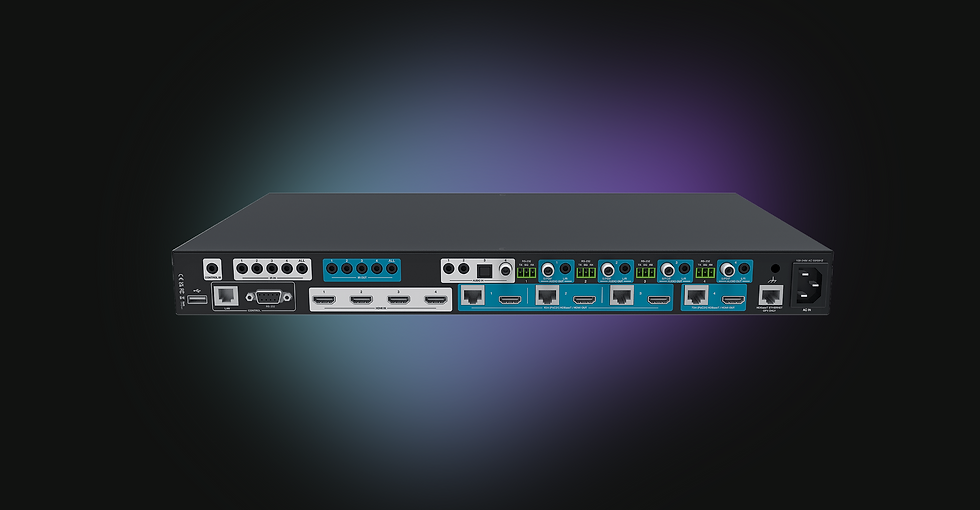
Conmutador de matriz HDMI 2.0 HDBaseT 4K60 4:4:4 8x8 (6+2)
-
8×8 HDMI 2.0 Matrix with HDBaseT
-
Route eight HDMI sources to two HDMI + six HDBaseT outputs.
-
HDMI Outputs - 1 & 2
-
HDBaseT Extension
-
Outputs 3-6 extend 4K60 4:4:4 up to 40 m (131 ft)
-
Outputs 7 & 8 extend up to 70 m (231 ft)
-
-
All outputs support 4K to 1080p scaling for lagecy displays.
-
HDR Support — HDR10, HDR10+, Dolby Vision, and HLG.
-
Stereo Audio Outputs — HDBaseT Outputs (3-8)
-
EDID Management — 21 presets, 2 user-defined, and copy modes for maximum compatibility.
-
PoC Powering — 24V PoC supplied to all HDBaseT receivers.
-
Control Options — Front panel OLED, IR, RS-232, TCP/IP, Netvio360 software, NetvioGo, or third-party drivers (Crestron, Control4).


8x6+2
HDBaseT y HDMI
Salidas de largo alcance
Control Integrado
Salidas de audio

El MX-HT2-0806-10 está diseñado como una solución rentable que prioriza la conmutación y extensión de video confiables, a la vez que optimiza las funciones de audio. Ofrece todo el rendimiento esencial necesario para la distribución de video multizona, sin el gasto adicional que supone la funcionalidad de audio más avanzada de los modelos MX-HT2-0404-10 y MX-HT2-0808-10.
El MX-HT2-0806-10 ofrece una combinación de salidas HDMI y HDBaseT, diseñadas para conexiones de pantalla tanto locales como extendidas. Las salidas 1 y 2 son HDMI, ideales para pantallas locales o cercanas que no requieren extensión.
Las salidas 3 a 6 son salidas HDBaseT estándar, que ofrecen vídeo 4K60 4:4:4 hasta 40 m (131 pies) a través de cable CAT con paso IR y RS-232. Las salidas 7 y 8 son salidas HDBaseT de largo alcance, que se extienden hasta 70 m (231 pies) a través de cable CAT, también con paso IR y RS-232.
Esta estructura brinda a los instaladores la capacidad de servir tanto a pantallas cercanas directamente desde el rack como a pantallas remotas a media o larga distancia, manteniendo las señales de control integradas en la misma conexión.
El MX-HT2-0806-10 no es compatible con ARC, pero proporciona salidas de audio estándar para todas las salidas HDBaseT (3-8). Para proyectos que requieren captura y enrutamiento ARC, considere el MX-HT2-0404-10 o el MX-HT2-0808-10, que incluyen funcionalidad ARC completa y funciones de audio avanzadas.
El MX-HT2-0806-10 ofrece una amplia gama de opciones de control para entornos audiovisuales profesionales. Se puede operar directamente desde los botones OLED del panel frontal, mediante el control remoto IR incluido, mediante control serie RS-232 o a través de la red mediante TCP/IP.
Para la configuración y gestión del sistema, la matriz es totalmente compatible con el software Netvio360, lo que permite a los instaladores configurar rápidamente el enrutamiento de video, el escalado y la gestión de EDID con una herramienta intuitiva y centralizada.
Además, el MX-HT2-0806-10 se integra a la perfección con la solución de control NetvioGo integrada para ofrecer interfaces intuitivas, o con sistemas de control de terceros como Crestron y Control4 mediante los controladores disponibles. Esta flexibilidad garantiza que los diseñadores de sistemas puedan seleccionar el método de control adecuado para cada proyecto.
Because the MX-HT2-0806-10 is a HDBaseT matrix system, it does not support ContentPlus+ dual-stream encoding or live software streaming like the JP4 AVoIP platform.
However, when used with this matrix, NetvioGo intelligently adapts by replacing live stream previews with either icon-based buttons or relevant library videos.
This approach emulates the live streaming experience for end users while maintaining a consistent, intuitive interface for switching and control.
No. El MX-HT2-0806-10 no se vende como un kit fijo porque cada conjunto de salidas tiene diferentes capacidades y la elección del cableado o del receptor depende de los requisitos de cada zona.
Salidas 1 y 2: Son salidas HDMI directas para pantallas locales o cercanas. Se pueden conectar mediante cables HDMI estándar de alta velocidad. Para distancias mayores, podrían requerirse extensores HDMI activos para mantener una calidad de señal fiable.
Salidas 3–6: Salidas HDBaseT con capacidad de extensión de hasta 40 m (131 pies) a 4K60 4:4:4. Son compatibles con el receptor RX-HT2-40-10, que también admite transmisión por infrarrojos y RS-232.
Salidas 7 y 8: Son salidas HDBaseT de largo alcance, con capacidad de hasta 70 m (231 pies) de extensión a 4K60 4:4:4. Deben emparejarse con el receptor RX-HT2-70-10 para alcanzar esta distancia extendida.
Este enfoque modular permite a los instaladores mezclar y combinar cables y receptores según la instalación, ya sean conexiones HDMI locales simples, conexiones HDBaseT de alcance medio o zonas de larga distancia que requieren alcance adicional.
El MX-HT2-0806-10 admite dos modelos de receptor, según los requisitos de distancia y zona:
RX-HT2-40-10 — Compatible con las salidas 3 a 6, proporcionando hasta 40 m (131 pies) de extensión 4K60 4:4:4 por cable CAT, con paso de IR y RS-232. También se puede usar con todas las salidas (3 a 8) si solo se requiere una extensión de 40 m, lo que lo convierte en la opción más flexible y económica para instalaciones uniformes.
RX-HT2-70-10: diseñado para las salidas 7 y 8, este receptor extiende señales hasta 70 m (231 pies) a 4K60 4:4:4 con paso directo de IR y RS-232, ideal para recorridos de larga distancia.
Las salidas 1 y 2 son salidas HDMI directas, que se conectan mediante cables HDMI estándar de alta velocidad para pantallas locales. Para transmisiones locales más largas, se pueden utilizar extensores HDMI activos.
Este diseño modular brinda a los instaladores la flexibilidad de mezclar y combinar modelos de receptores o usar el RX-HT2-40-10 en todas partes para lograr simplicidad y ahorro de costos cuando un alcance de 40 m es suficiente.

Solución de control integrado
Disfrute de una configuración sencilla con nuestro soporte para videowall de 16x16, que ofrece modos horizontal y vertical con biseles ajustables. Nuestra interfaz de software de primera calidad garantiza una experiencia fluida. Además, los clientes obtienen control de usuario y transmisión de vista previa en tiempo real de altísima calidad para una inmersión total.

A premier video configurator simplifying the set-up & configuration of video systems, working across multiple platforms & products.
Un creador de aplicaciones gratuito que permite la creación de Android, Apple para controlar soluciones Netvio y una variedad de dispositivos de terceros, incluidas pantallas, fuentes de entrada y sistemas de audio de terceros.
Solución de control integrada gratuita, ideal para cuando un sistema de control tradicional resulta excesivo en términos de coste o complejidad. Licencia completa incluida, compatible con dispositivos Android y Apple, incluyendo la pantalla táctil de Netvio, la TS-13-10.
%20(1).png)
.png)
.png)
.png)
.png)
.png)

.png)

The configuration process begins when using a Netvio system. This does not apply to the Dante AV-A and Dante AV solutions, where all configurations are handled within the Dante controller, as covered in a previous webinar. Instead, this applies when using a Netvio matrix or Netvio JP4/JP460 AV over IP. The software automatically discovers connected devices, verifies their online status, and checks for the latest firmware versions. If updates are needed, it provides guidance to ensure everything is up to date. It also assists in configuring the entire system, including the control app. This software is available free of charge on our website for both Mac and Windows. While I’m running it on a Mac today, it operates natively on Windows as well. Upon installation and launch, the software scans the network to identify any Netvio devices. A Netvio controller is responsible for discovering all encoders and decoders, serving as a single configuration point for the entire system. This centralized approach is crucial when managing large-scale deployments, potentially with hundreds of devices, as it eliminates the need to connect to each one individually. The software also checks whether the firmware is up to date. If an update is required, a pop-up window prompts the user to install the latest version. These updates are sourced from the cloud but are stored locally on the laptop. This ensures that even in locations without internet access, users can still install the most recent version available from their last online session. Additionally, the software maintains its own updates via the cloud. Whenever a new version or updated drivers for the control app become available, they are automatically downloaded upon launching the application. This seamless integration with cloud infrastructure ensures the system remains consistently updated for the best user experience.
To simplify the integrator’s experience, the software eliminates the need to manually enter or modify IP addresses. Once the system detects a product, it automatically links to the web UI of the controller or matrix, allowing seamless and secure login. We have invested significant time in ensuring our software meets the highest security standards required by institutions such as banks, educational facilities, and casinos—organizations with exceptionally stringent network security requirements. Our system incorporates robust security measures, including a fully encrypted web interface that never transmits unencrypted passwords. We utilize SSH for encrypted communication between all devices and implement AES-256 encryption for video streams, ensuring that unauthorized access is entirely prevented.
Once connected to the system, the interface remains consistent whether using a matrix or any version of the AV over IP solution. In this example, an IP device has been reset. If this were a matrix, the inputs and outputs would be preset (e.g., input 1, 2, 3, 4 and output 1, 2, 3, 4). However, with AV over IP, there is an additional step to scan and assign all input and output devices to the controller. The system automatically searches the network and detects devices. One of Netvio’s key advantages is its pre-configured network switches. Typically, configuring network switches for multicast and IGMP snooping requires at least an hour of training, along with specific settings for various switch brands. Training on one brand, such as Cisco, would not apply to others like Netgear or Juniper, requiring extensive documentation and configuration guides. Instead, Netvio offers a streamlined solution with pre-configured 24-port and 48-port switches. These plug-and-play switches simplify deployment for systems with up to 20 or 45 devices. They are clearly labeled for connecting controllers, encoders, decoders, and Wi-Fi networks, ensuring seamless configuration and control. Once all devices synchronize with the controller, the system applies a preset configuration to each unit, restoring them to factory defaults. Initially, the discovered devices appear as red icons. During synchronization, the icons change to indicate progress. Once complete, a blue RJ45 icon confirms successful synchronization. If an issue arises, the icons may turn red, signaling a network configuration problem. At that stage, reviewing the switch settings would be necessary. Using a Netvio switch, video can be routed across the network within seconds. Expanding any input reveals a preview stream, providing a real-time snapshot of each source. This feature is particularly useful during initial setup, allowing easy identification and labeling of sources. Instead of referring to a device by its MAC address or model number, sources can be named intuitively, such as "Apple TV" or "Media Player." This preview function also serves as a troubleshooting tool. If network issues are present, corrupted video may appear in the preview window, indicating that the HDMI connection at the source is fine, but there is a network-related issue preventing proper video transmission. For technical support, remote access to this screen provides a wealth of diagnostic information, streamlining troubleshooting. Key details such as resolution, encoder format, EDID settings, and IP validity are displayed. Enabling audio information reveals source audio type and even the Dante IP address of the device. Although the IP address may not yet be valid in this demonstration, it can be configured shortly. The extensive two-way feedback and diagnostic data provided by Netvio surpass many other AV over IP solutions. Simply accessing this screen remotely allows technicians to identify and resolve most issues quickly. Finally, outputs can be labeled for organization, which will be useful later in the setup process. Devices can be reordered using arrows or by dragging them into place. This organization is particularly beneficial during control system configuration, as grouping adjacent screens simplifies programming and enhances workflow efficiency.
One of the things we do exceptionally well is EDID management. Many brands still rely on DIP switches across their products, but we only use them for EDID on our point-to-point HDBaseT extenders that support EDID management. I personally dislike seeing DIP switches everywhere else because it means you have to dig out the user guide just to figure out the settings. When it comes to EDID copy, using DIP switches can be a real hassle. That’s why our solution includes a built-in list of EDIDs, and we also allow importing EDIDs from the receivers or even from your laptop if you have stored EDIDs. With just a single click—by hitting "Set EDID" or importing the file—you’re good to go. It’s quick, seamless, and efficient. Our system is designed to be incredibly user-friendly. You can easily view the EDID data in use, which can also be copied and analyzed using an EDID management software tool. This is a highly powerful EDID management solution—one that I frequently use in tech support to help people achieve the best picture and audio quality for their systems.
The audio input on each encoder can be configured with three available sources: HDMI audio, a dedicated analog input, or two Dante input channels on the chipset. In most cases, HDMI will be the primary audio source, but there are instances where analog or Dante may be required. If Dante is enabled, the encoder’s Dante input will appear in Dante Controller, allowing it to function as a transmitter or receiver for audio distribution.
If you're using our GO control solution, the integrated GO app runs on iPhone, iPad, Android, and our dedicated 13-inch touch panel, designed for rugged environments like bars and gyms. The interface is fully configured through the Netvio 360 software tool. The AppBuilder feature allows users to create a new project based on the configured controller or matrix. It automatically imports device and display names, controller IP settings, and login credentials, requiring minimal setup. Uploading the project results in a functional control interface, displaying sources and screens for easy content switching. For source device control, simply drag and drop devices like set-top boxes or media players into the app. Control options include IR, CEC, or network-based control. For example, a Fire TV uses CEC over HDMI, eliminating the need for an IR connection. Netvio also supports audio control integration with leading amplifier brands like Blaze, Cloud, Monitor Audio, Rotel, Sonance, and Yamaha, with Powersoft and LEA support coming soon. Adding an amplifier prompts for an IP address, after which inputs and outputs can be assigned, linking encoders to the appropriate display zones. A newly launched Multiviewer allows up to four inputs to be displayed on a single screen, ideal for picture-in-picture setups. Encoders feature HDMI loop-through, enabling flexible connections, including streaming the multiview output across the network to multiple zones. Presets can be customized or disabled as needed. To organize the layout, area buttons can be dragged onto designated zones, with custom images assigned from a built-in library or user-uploaded files. Once configured, the project can be published via a QR code for quick app setup or uploaded directly to the controller for easy device discovery. This streamlined workflow ensures an intuitive, fully customized control experience with minimal setup.
NetvioGO includes a demo mode that allows users to explore different project types, including sports bars, corporate, residential, and yacht environments. The sports bar project is often preferred as it showcases the most functionality, including multiple video walls and screens. The app’s settings menu offers options to disable preview videos for a simplified interface, set automatic timeout durations, and disable IR, USB, and serial routing for faster switching in large display setups. A master power switch allows all displays and amplifiers to be turned off with a single press—ideal for venues like sports bars that require a quick system shutdown at closing time. Users can also upload a customizable logo, such as an integrator’s or venue’s branding. For video switching, users can select individual screens or apply changes across multiple displays—perfect for large events like the World Cup. A control interface enables multi-page, swipeable controls for source devices. Additionally, the ContentPlus stream can be displayed full-screen on devices like iPads, allowing staff to monitor content in locations without a TV while still controlling the source. The audio controls provide two-way feedback for volume and mute status. Independent audio switching allows users to change audio zones separately from video sources. The audio lock feature ensures that audio remains unchanged when switching video sources—useful in hospitality settings where different screens may need to display varied content while maintaining a single audio source. For video walls, users can switch between preset layouts with a single tap, drag and drop content, and save new configurations as presets for future use. While NetvioGO is not designed to replace full control systems like Symetrix, Crestron, or Q-SYS, it offers valuable functionality at no additional cost, making it a powerful option for venues that don’t require a fully integrated control system.
RX-HT2-40-10
Receptor 4K60 de 40 m (131 pies)

MX-HT2-0404-10
Matriz HDBaseT 4x4
RX-HT2-70-10
Receptor Ethernet ARC 4K60 de 70 m (231 pies)

MX-HT2-0808-10
Matriz HDBaset de 8x8
