
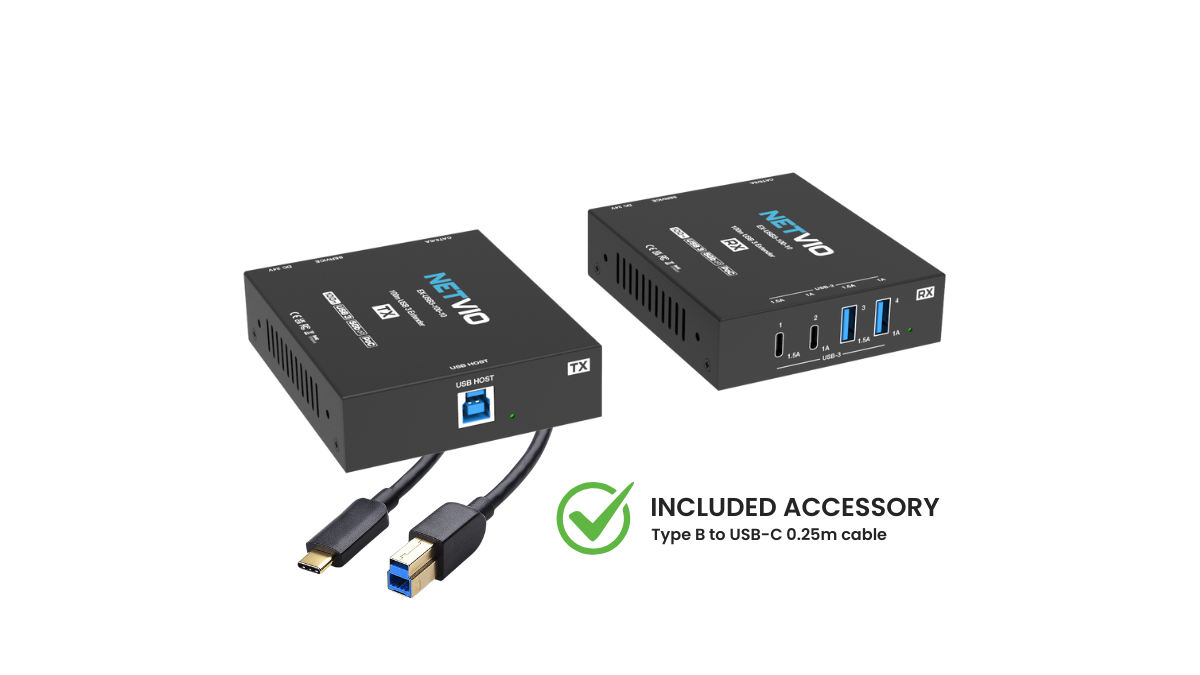


EX-USB3-100-10
USB 3.2 Gen 1 (5 Gbps) Extender over HDBaseT with 100m (328ft) Range, PoC
-
USB 3.2 Gen 1 SuperSpeed Extension – Delivers full 5 Gbps USB performance up to 100 m (331 ft) over Cat6, Cat6aA (70 m over Cat6).
-
Plug & Play Simplicity – No drivers or software required; hardware acceleration ensures stable performance across Windows, macOS, and Linux.
-
Flexible Power Options – Dual-mode PoC design allows power from either the transmitter (TX) or receiver (RX) with the included 24 V / 2 A PSU.
-
Versatile USB Connectivity – Receiver provides 2 × USB-A and 2 × USB-C ports, each with dedicated 1.0 A & 1.5 A power outputs for peripherals and charging.
-
Durable, Professional Design – Compact metal enclosure built for reliability in residential, commercial, and IT environments.
-
Universal Applications – Ideal for video conferencing, PTZ cameras, interactive classrooms, digital signage, storage expansion, and professional AV systems.
-
Broad Compatibility – Fully backwards compatible with USB 3.1, 3.0, 2.0, and 1.1 devices, supporting a wide range of peripherals.


.png)
USB3.2 Gen1
5Gbps
PoC
USB-C
Free Cable
Why USB3.2 Gen1?
USB 3.2 Gen 1 delivers transfer speeds up to 5 Gbps, providing a tenfold improvement over USB 2.0. This bandwidth is crucial for modern AV and IT devices such as HD/4K webcams, PTZ cameras, external drives, and collaboration tools, ensuring smooth performance and low latency.
With fast and reliable connectivity, USB 3.2 Gen 1 supports quick file transfers and responsive peripheral control, making it the trusted standard for professional AV integration and high-performance workspaces.


USB 3.2 Gen 1, also known as SuperSpeed USB, supports data transfer rates up to 5 Gbps, which is around 10× faster than USB 2.0. This speed is critical for modern applications such as high-resolution webcams, PTZ cameras, external storage drives, and collaboration tools that require real-time responsiveness. By supporting Gen 1, the EX-USB3-100-10 ensures full compatibility with today’s performance demands while still working with older USB 2.0 and 1.1 devices.
The extender delivers up to 100 m (331 ft) of USB 3.2 Gen 1 connectivity using Cat6A cabling, and up to 70 m (231 ft) using Cat6. This makes it ideal for large spaces such as classrooms, auditoriums, and conference facilities where USB peripherals need to be placed far from the host PC.
Yes. While optimized for USB 3.2 Gen 1 (5 Gbps), the system is fully backwards compatible with USB 3.1, 3.0, 2.0, and 1.1 devices. This allows you to integrate legacy peripherals—such as keyboards, mice, and printers—alongside modern high-bandwidth devices like storage drives and cameras.
The extender features a dual-mode Power over Cable (PoC) design, which means you can power the system from either the transmitter (TX) or the receiver (RX). This flexibility simplifies installation when only one side of the system has access to a power outlet.
The RX includes two USB-A ports and two USB-C ports, each with dedicated 1.0 A and 1.5 A power outputs. This ensures compatibility with a wide variety of peripherals including webcams, interactive displays, storage devices, and conferencing equipment, while also allowing limited charging capability.
No. The EX-USB3-100-10 is completely plug-and-play. It requires no additional drivers or configuration, making it quick and easy to deploy in Windows, macOS, and Linux environments.
The EX-USB3-100-10 is ideal for video conferencing, PTZ camera integration, interactive classrooms, digital signage, auditoriums, storage expansion, and other professional AV/IT installations where stable, long-distance USB connectivity is required.
No. The USB-C ports on the receiver are for USB data and peripheral connections only. They do not support DisplayPort Alt Mode or HDMI output, which are required for video transport over USB-C. This means you cannot connect a display or monitor directly to the extender via USB-C. To extend video alongside USB, you would need to use Netvio’s HDMI or AVoIP solutions in combination with the USB extender.
.png)


.png)


